

Control what the model sees.
Mask detected personal data in prompts. Restore it from returned pseudonyms.

- Your product sends
jane@example.com- Personal data guardrail
- Replace email
- The model receives
[[email:7f2a91bc]]
Policy examples
Set guardrails per customer.
Apply different policies to customers using the same feature. Choose a control to see exactly what the gateway changes or refuses.
Personal data / Pseudonymize
- Original request
- Contact jane@example.com
- Model receives
- Contact [[email:7f2a91bc]]
Before the model call, Alectura replaces the detected email with a pseudonym that stays consistent within this organization. It restores recognized pseudonyms in the reply, including in streams and tool calls.
Credentials / Redact
- Original request
- Check this AWS access key: AKIAIOSFODNN7EXAMPLE
- Model receives
- Check this AWS access key: [redacted:aws_access_key]
Alectura replaces the detected secret with a redaction marker. The provider can still use the surrounding support ticket.
Model access / Refuse
- Original request
- Request names an unapproved model
- Gateway decision
- Request refused before the provider call
When the requested model falls outside the customer’s allowlist, the gateway refuses the request.
Processing region / Restrict routing
- Original request
- EU-only customer · no eligible EU connection
- Gateway decision
- Request refused before the provider call
Alectura restricts this customer to approved EU processing regions. It refuses the request if no eligible connection can serve it.
Cost tracking
Who drove the spend?
Attribute model usage to each customer or feature at provider list prices. Set a spend limit for a user or organization.
Explore spend limits- Support replies$120
- Search$40
At provider list prices
Regional routing evidence
Where did this customer’s requests go?
Give your buyer the processing regions, policy versions and guardrail findings for their organization.
The Australia gateway received these requests. Follow the highlighted paths to the processing region and the requests that stopped before a provider call.
Open full-size chart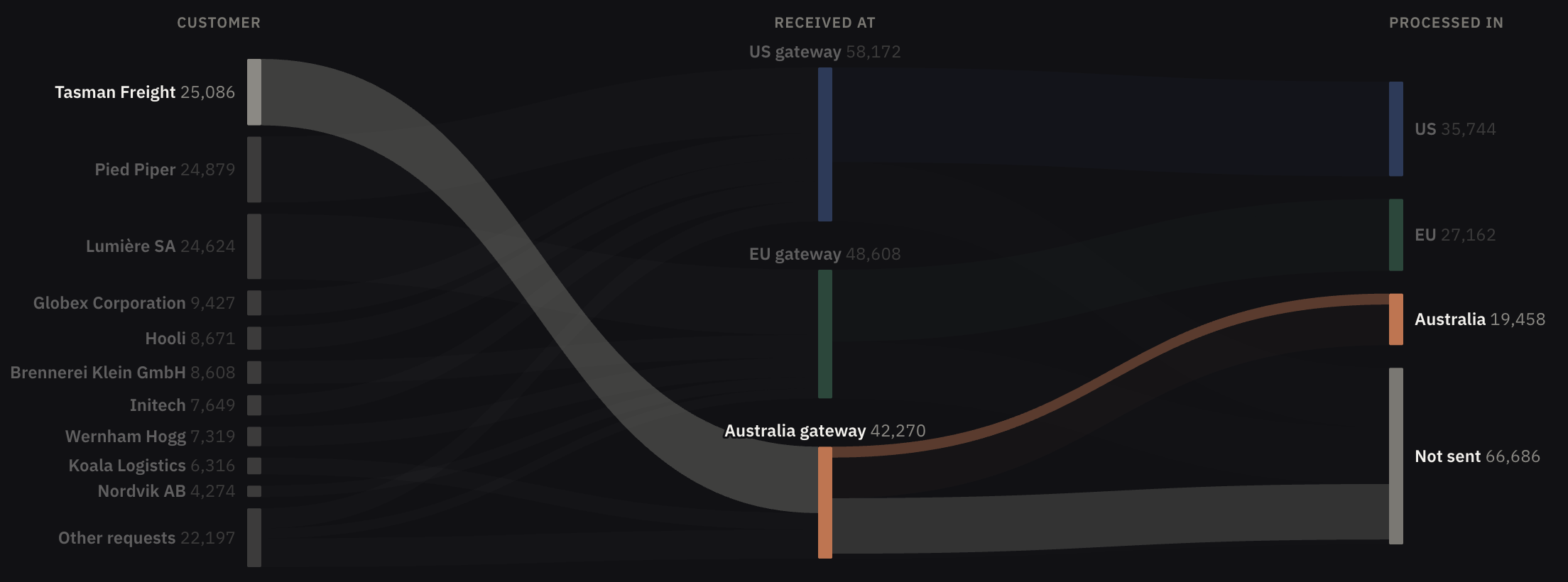
Developer quickstart
Keep the SDK you use today.
Change the base URL and API key. Send your customer’s identifier with the request so Alectura applies the matching policy.
- Base URL
- Your regional gateway
- API key
- Your environment’s sending key
- Customer
Alectura-Organization
import os

from openai import OpenAI

client = OpenAI(
    base_url="https://us.gateway.alecturalabs.com/openai/v1",
    api_key=os.environ["ALECTURA_API_KEY"],
)
response = client.responses.create(
    model="gpt-5-mini",
    input="Say hello in French.",
    extra_headers={
        "Alectura-Organization": "initech",
        "Alectura-User": "user_42",
        "Alectura-Plan": "pro",
    },
)
print(response.output_text)
import os

from anthropic import Anthropic

client = Anthropic(
    base_url="https://us.gateway.alecturalabs.com/anthropic",
    api_key=os.environ["ALECTURA_API_KEY"],
)
message = client.messages.create(
    model="claude-haiku-4-5",
    max_tokens=1024,
    messages=[{"role": "user", "content": "Say hello in French."}],
    extra_headers={
        "Alectura-Organization": "initech",
        "Alectura-User": "user_42",
        "Alectura-Plan": "pro",
    },
)
print(message.content[0].text)
import os

from google import genai

client = genai.Client(
    api_key=os.environ["ALECTURA_API_KEY"],
    http_options={
        "base_url": "https://us.gateway.alecturalabs.com/gemini",
        "headers": {
            "Alectura-Organization": "initech",
            "Alectura-User": "user_42",
            "Alectura-Plan": "pro",
        },
    },
)
response = client.models.generate_content(
    model="gemini-3.5-flash",
    contents="Say hello in French.",
)
print(response.text)
Product walkthrough
Trace a request from your product.
Bring a sample prompt. See what reaches the model under your customer’s policy, then inspect the reply and its cost.